📊 Mastering Float Concepts & Critical Path Analysis
Understanding Total Float and Free Float is the key to successful construction project time management
📌 Introduction: Why Should You Care About Float?
In construction project management, Float (or Slack) is one of the most critical concepts every project manager must master. Imagine you're managing a large residential building project and need to know:
- Which activities can be delayed without affecting the project delivery date?
- What is the maximum allowable delay for each activity?
- Which activities are critical and require precise monitoring?
- How do delays in one activity affect successor activities?
All these questions find their answers in understanding Total Float, Free Float, and Critical Path.
🎯 Chapter One: Total Float (TF)
1.1 Precise Definition
📘 Total Float - Academic Definition
Total Float (TF), also called Total Slack, is the amount of time an activity can be delayed from its Early Start without delaying the planned project completion date.
In other words: it's the schedule flexibility available for an activity before it becomes "critical" and affects the project delivery date.
1.2 Total Float Formula
⚡ Basic Formula (PMBOK Standard):
Total Float = Late Start (LS) - Early Start (ES)
OR
Total Float = Late Finish (LF) - Early Finish (EF)
Where:
- Early Start (ES): Earliest date an activity can start
- Late Start (LS): Latest date an activity can start without delaying the project
- Early Finish (EF): Earliest date an activity can finish
- Late Finish (LF): Latest date an activity can finish without delaying the project
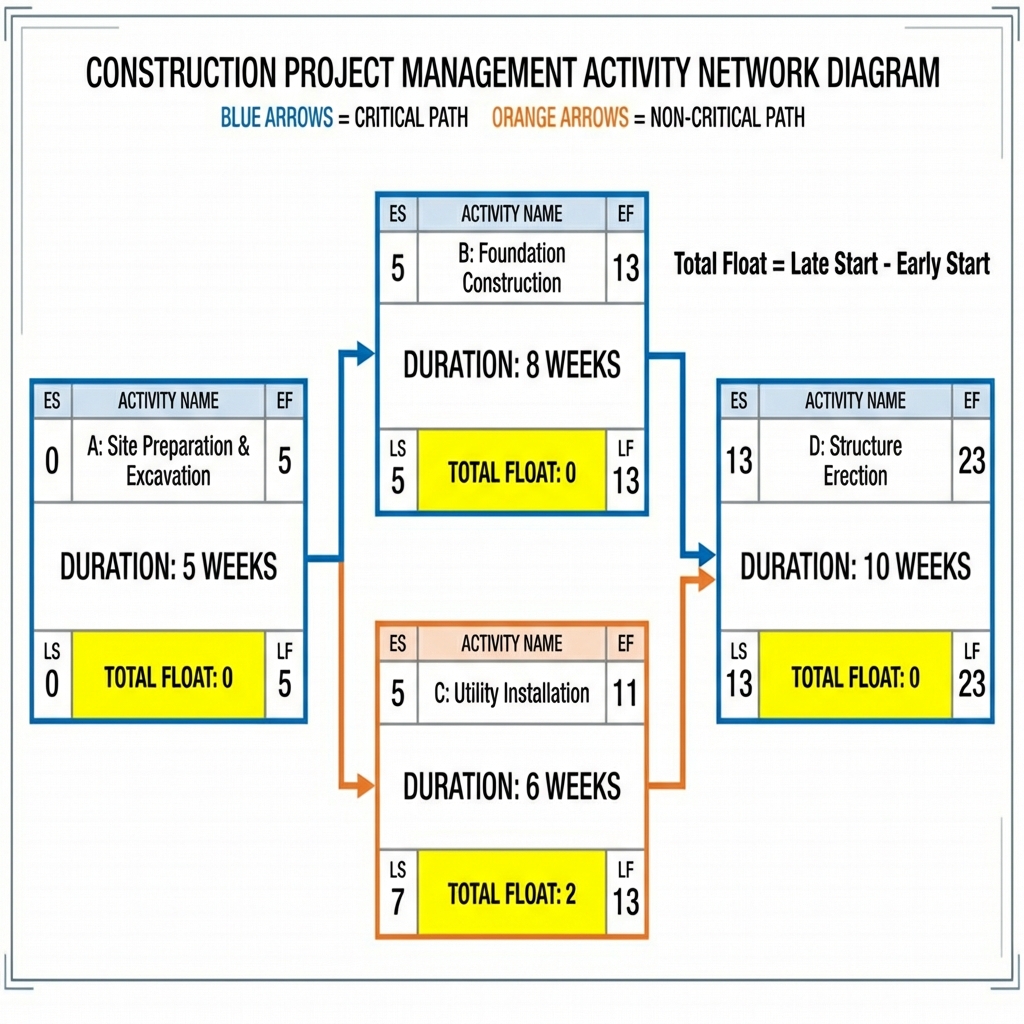
Figure 1: Total Float concept illustrated in activity network
1.3 Detailed Practical Example
💡 Example: Concrete Pouring Activity
Activity Details:
- Activity Name: Pour Concrete Columns - First Floor
- Duration: 3 days
- Early Start (ES) = Day 10
- Early Finish (EF) = Day 12 (ES + Duration - 1)
- Late Start (LS) = Day 15
- Late Finish (LF) = Day 17
Calculation:
Total Float = LS - ES = 15 - 10 = 5 days
OR: Total Float = LF - EF = 17 - 12 = 5 days
Practical Interpretation:
This means the "Pour Concrete Columns" activity can be delayed up to 5 full days without delaying the project completion. You can start on Day 10 (earliest) or delay the start until Day 15 (latest) and the project won't be affected.
⚠️ Important Warning: If you consume all 5 days of Float, this activity becomes Critical (TF=0) and any additional delay, even one day, will delay the entire project!
🎯 Chapter Two: Free Float (FF)
2.1 Precise Definition
📗 Free Float - Academic Definition
Free Float (FF), also called Free Slack, is the amount of time an activity can be delayed without delaying the Early Start of any immediately following (successor) activities.
In other words: it's the "free" time you can use for an activity without forcing successor activities to wait.
2.2 Free Float Formula
⚡ Basic Formula (PMBOK Standard):
Free Float = Early Start of Successor - Early Finish of Current Activity - 1
Simplified:
Free Float = (ESsuccessor) - (EFcurrent) - 1
Important Note:
Free Float ≤ Total Float (always)
If an activity has multiple successors, Free Float is calculated based on the successor with the earliest ES.
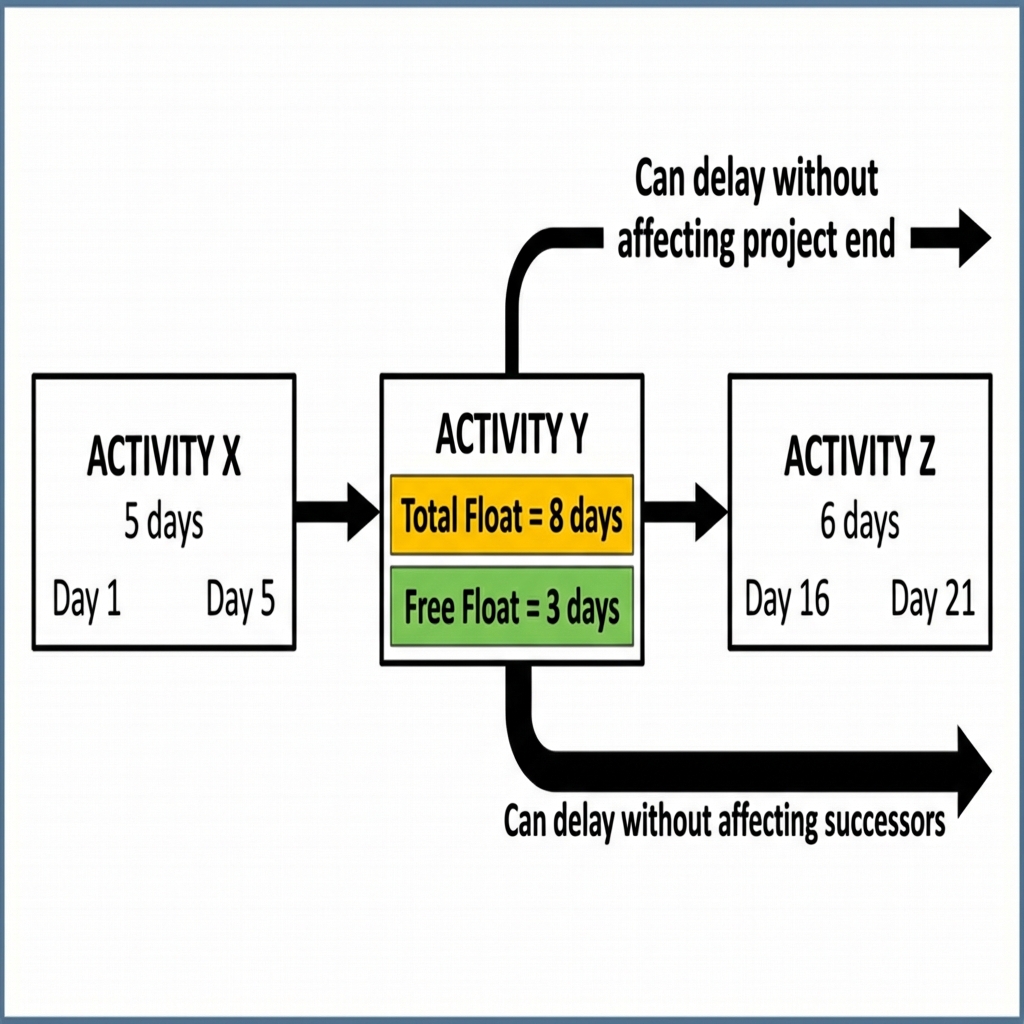
Figure 2: Difference between Total Float and Free Float
2.3 Detailed Practical Example
💡 Example: Tile Installation Activity
Assume we have 3 sequential activities:
- Activity X: Floor Preparation (ES=5, EF=8, Duration=3 days)
- Activity Y: Install Tiles (ES=9, EF=14, Duration=5 days)
- Activity Z: Install Ceramics (ES=16, EF=21, Duration=5 days)
Calculate Total Float for Activity Y:
Assume LS for Activity Y = Day 17
Total Float = LS - ES = 17 - 9 = 8 days
Calculate Free Float for Activity Y:
Free Float = ES(Z) - EF(Y) - 1
Free Float = 16 - 14 - 1 = 1 day
Practical Interpretation:
- Total Float = 8 days: You can delay "Install Tiles" up to 8 days without delaying the project
- Free Float = 1 day: You can delay it only 1 day without affecting the start of "Install Ceramics"
- The Difference: If you delay the activity more than 1 day (but less than 8 days), the project won't be delayed but Activity Z will start later
🔍 Chapter Three: Difference Between Total Float and Free Float
| Comparison Point | Total Float | Free Float |
|---|---|---|
| Definition | Slack without delaying the project | Slack without delaying successor activities |
| Formula | LS - ES or LF - EF | (ES successor) - (EF current) - 1 |
| Impact | On project completion date | On successors' start dates |
| Value Relationship | Always ≥ Free Float | Always ≤ Total Float |
| On Critical Activities | TF = 0 | FF = 0 |
| Practical Use | Strategic planning and overall project management | Detailed planning and coordinating sequential activities |
| Responsibility | Project management level decision | Contractor/executor level decision |
🔑 Critical Point
Fundamental Difference:
- Total Float: "Shared" among activities on the same path - if one activity consumes it, less is available for others
- Free Float: "Private" to the activity itself - using it doesn't affect other activities' flexibility
⚖️ Chapter Four: Healthy Float Limits in Software
4.1 Acceptable Values and Warnings
📊 Healthy Float Standards by Project Type
| Project Type | Acceptable Total Float | Warning Indicator |
|---|---|---|
| Small Projects (<6 months) | 5-15 days for non-critical activities | TF > 20 days (excessive flexibility = poor planning) |
| Medium Projects (6-18 months) | 10-30 days | TF > 45 days |
| Large Projects (>18 months) | 15-60 days | TF > 90 days |
| Critical Activities | TF = 0 | Negative TF (schedule is behind!) |
4.2 Negative Float - Emergency State
🚨 Negative Float: Danger Alert!
Definition: When Total Float < 0, it means the project is already behind schedule!
Common Causes:
- Unrealistic completion date (imposed by client)
- Unexpected delays in critical activities
- Scope changes without schedule adjustment
- Resource constraints not properly calculated
Solutions:
- Crashing: Accelerate critical activities (add resources, overtime)
- Fast Tracking: Execute parallel activities that were sequential
- Re-baseline: Reschedule project with realistic date (last resort)
4.3 Software Notes (Primavera P6, MS Project)
💻 Software Tips
In Primavera P6:
- Total Float and Free Float can be displayed in separate Columns
- Use Filter to show activities with TF < 10 for close monitoring
- "Near Critical Activities" = activities with TF between 0 and 10 days
- Color Coding: Red for critical, Yellow for Near Critical, Green for normal
In MS Project:
- Total Slack = Total Float (same concept, different term)
- Free Slack = Free Float
- Use Gantt Chart Wizard to highlight Critical Path
🛣️ Chapter Five: Critical Path (CP)
5.1 Comprehensive Definition
🔴 Critical Path
Classical Definition (PMBOK):
The Critical Path is the longest path from project start to finish, consisting of a sequence of activities that have zero total float (TF = 0).
Importance:
- Determines the shortest possible duration to complete the project
- Any delay in any activity on the Critical Path = project delay
- Focuses project manager's attention on "risky" activities
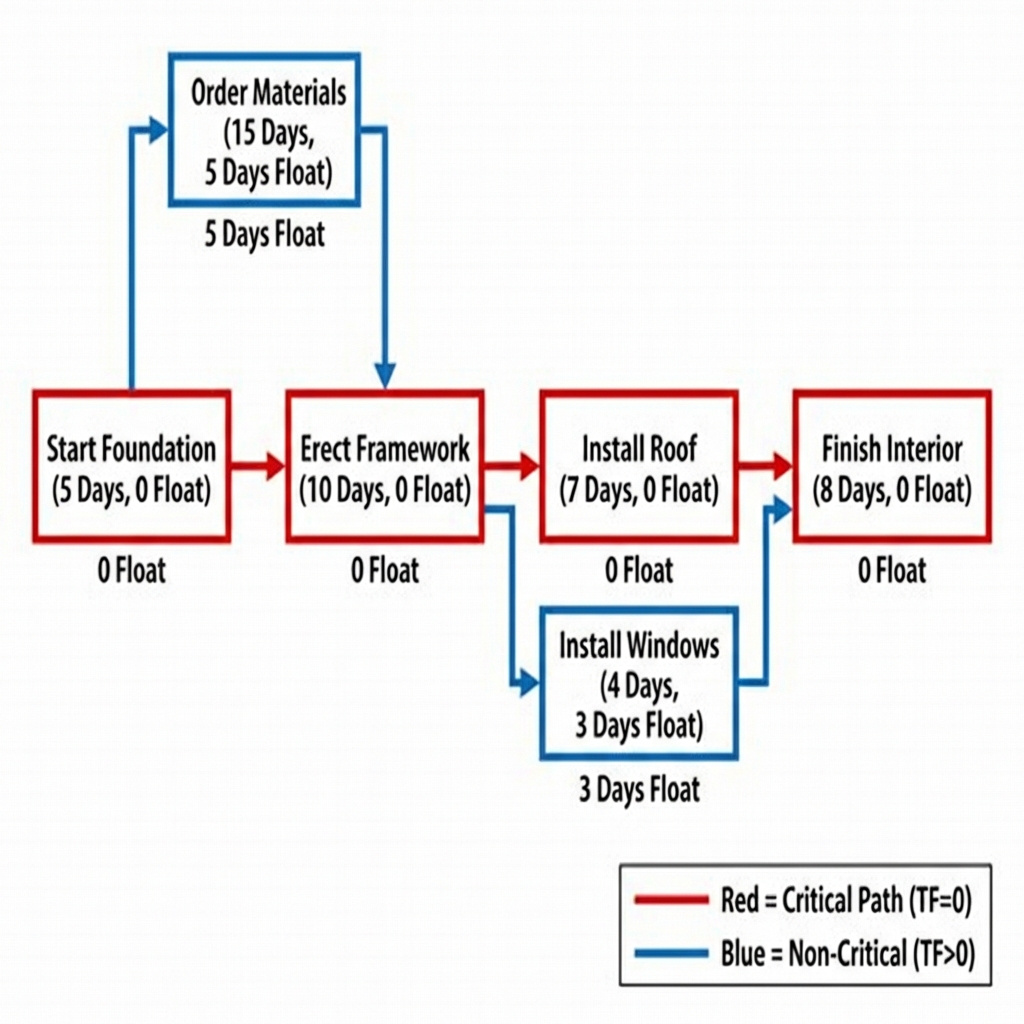
Figure 3: Critical Path (in red) with non-critical activities (in blue)
5.2 Critical Path Characteristics
🎯 Basic Characteristics of Critical Path:
- Total Float = 0: All activities on the Critical Path have TF = 0
- Longest Path: Sum of durations on Critical Path = project duration
- Variable: Critical Path can change during project execution
- Multiple: A project may have more than one Critical Path
- Sensitive: Any delay in it = direct project delay
5.3 Critical Path Method (CPM)
🔢 Steps to Calculate Critical Path
Step 1: Forward Pass
- Start from first activity and calculate ES & EF for each activity
- ES = Maximum EF of predecessors + 1
- EF = ES + Duration - 1
Step 2: Backward Pass
- Start from last activity and calculate LF & LS for each activity
- LF = Minimum LS of successors - 1
- LS = LF - Duration + 1
Step 3: Calculate Float
- TF = LS - ES (or LF - EF)
- Activities with TF = 0 are critical activities
Step 4: Identify Path
- Draw the path connecting all activities with TF = 0 from start to finish
💡 Complete Practical Example: Calculating Critical Path
Small Villa Construction Project - Activities:
| Activity | Duration (days) | Predecessor | ES | EF | LS | LF | TF |
|---|---|---|---|---|---|---|---|
| A: Excavation | 5 | - | 0 | 4 | 0 | 4 | 0 |
| B: Foundations | 8 | A | 5 | 12 | 5 | 12 | 0 |
| C: Columns | 10 | B | 13 | 22 | 13 | 22 | 0 |
| D: Plumbing | 6 | A | 5 | 10 | 7 | 12 | 2 |
| E: Electrical | 7 | C, D | 23 | 29 | 23 | 29 | 0 |
| F: Finishes | 8 | E | 30 | 37 | 30 | 37 | 0 |
Critical Path: A → B → C → E → F
Project Duration: 5 + 8 + 10 + 7 + 8 = 38 days
Non-Critical Activities: D only (TF = 2 days)
⚠️ Result Interpretation:
- Cannot complete project in less than 38 days
- Activities A, B, C, E, F are critical - any delay delays the project
- Activity D (Plumbing) can be delayed 2 days without impact
- If C delays 1 day, delivery date becomes 39 days
🔗 Chapter Six: Relationship Between Float and Critical Path
🔄 Fundamental Relationship
Golden Rule:
Activity on Critical Path ⟺ Total Float = 0
Detailed Relationship:
- Critical Activities:
- TF = 0
- FF = 0 (usually)
- ES = LS
- EF = LF
- Near-Critical Activities:
- 0 < TF < 5 (or 10 depending on standard)
- Require close monitoring as they may become critical
- Non-Critical Activities:
- TF > 5
- Have execution flexibility
- Can be used for resource reallocation
💡 Float Usage Strategy
For Efficient Project Management:
- Use TF for Planning: Determine which activities can be delayed during resource issues
- Use FF for Coordination: Determine safety margin when coordinating with contractors
- Monitor Float Continuously: Track float consumption and don't let it run out
- Distribute Resources Wisely: Move resources from high-TF activities to critical ones when needed
↔️ Chapter Seven: Longest Path
7.1 Definition and Difference from Critical Path
🟣 Longest Path - Advanced Concept
Definition:
Longest Path is the path with the greatest number of relationships and dependencies between activities, not necessarily the longest time duration.
⚠️ Warning: Common Mistake!
Mistake: Believing that Longest Path = Critical Path
Reality: They may coincide, or they may be completely different!
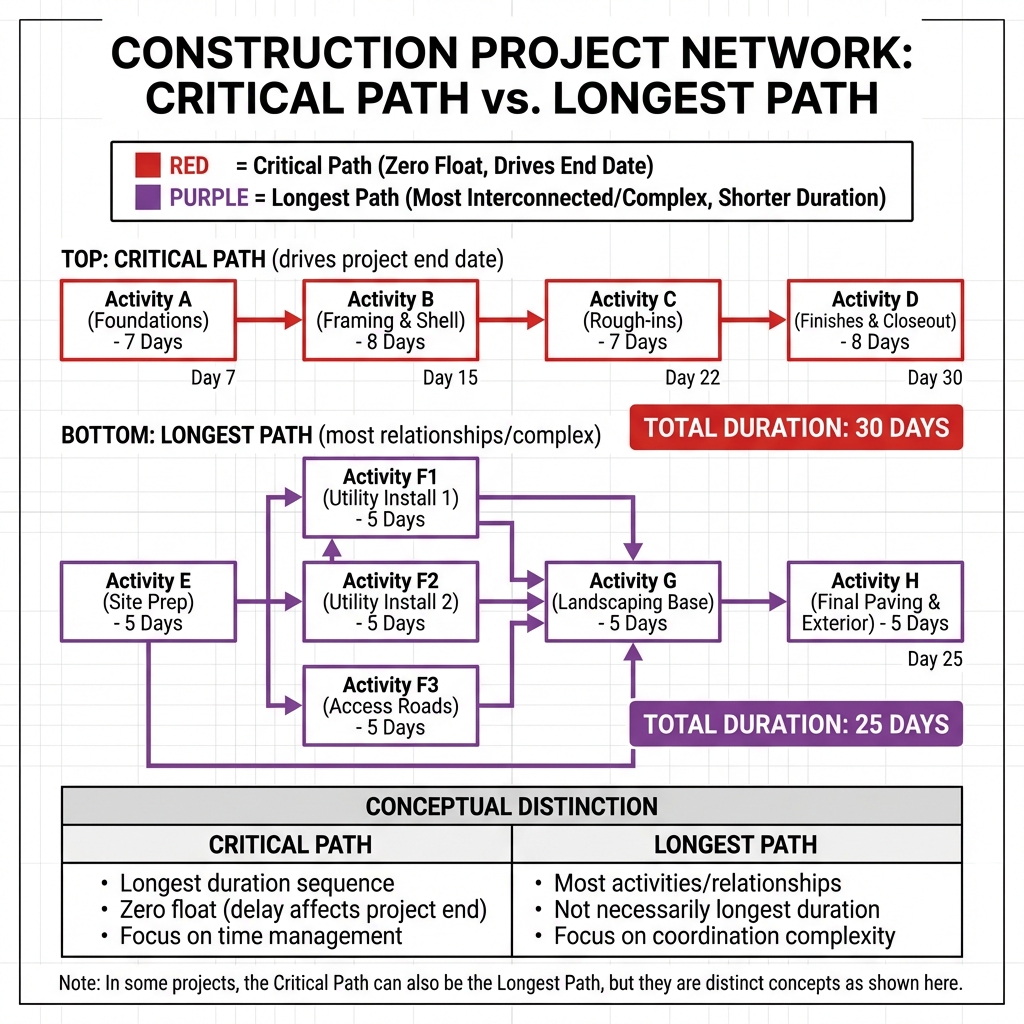
Figure 4: Comparison between Critical Path and Longest Path
7.2 Fundamental Difference Between Critical Path and Longest Path
| Comparison Point | Critical Path | Longest Path |
|---|---|---|
| Definition | Path that determines project duration | Path with most relationships/dependencies |
| Criterion | Total Float = 0 | Number of Predecessors & Successors |
| Objective | Time management | Complexity and coordination management |
| Change | Changes with delays | Rarely changes (project structure is fixed) |
| Importance | Critical for delivery date | Critical for coordination quality |
| In Software | Standard feature in all software | Advanced feature (P6, Spider Project) |
7.3 When Does Longest Path Matter?
📌 Longest Path Use Cases
- In Complex Projects:
Major infrastructure projects (power plants, airports) where coordination is sometimes more important than time
- Managing Contractors:
Activities on Longest Path require maximum coordination between different parties
- Risk Analysis:
Longest path means higher probability of coordination problems
- Resource Planning:
Activities on Longest Path may need more project manager attention
💡 Illustrative Example: Difference Between Both Paths
Scenario: Hospital Project
Critical Path:
Excavation (7 days) → Foundations (8 days) → Concrete Structure (20 days) → Operational Finishes (10 days)
Total: 45 days
Longest Path (in terms of relationships):
MEP Work (electrical, plumbing, HVAC) → Requires coordination with 15 different contractors → 30 interconnected activities
Total: 40 days (TF = 5)
Result:
- Concrete Structure is critical - determines project date
- MEP Work is longest - needs intensive coordination despite not being critical
- Successful project management = monitor both!
📚 References and Sources
Academic and Professional References
- Project Management Institute (PMI) - A Guide to the Project Management Body of Knowledge (PMBOK Guide), 7th Edition
- Association for the Advancement of Cost Engineering (AACE International) - Recommended Practice No. 10S-90: Cost Engineering Terminology
- Primavera P6 Professional Documentation - Oracle Corporation
- Construction Management Association of America (CMAA) - Standards of Practice
- British Standards Institution (BSI) - BS 6079-1:2010 Project Management Principles and Guidance
- The Planning and Scheduling Professional Handbook - American Association of Cost Engineers
- Construction Extension to PMBOK Guide - Project Management Institute
- ISO 21500:2012 - Guidance on Project Management
- International Project Management Association (IPMA) - Individual Competence Baseline (ICB)
- Royal Institution of Chartered Surveyors (RICS) - Project Management Standards
Planning Software and Tools
- Primavera P6 Enterprise Project Portfolio Management - Oracle
- Microsoft Project Professional
- Asta Powerproject
- Spider Project
- Critical Path Method (CPM) - Original Research by DuPont & Remington Rand (1957)
🎓 Final Summary
- Total Float: Activity flexibility without delaying the project
- Free Float: Activity flexibility without delaying successor activities
- Critical Path: The critical path that determines project duration (TF=0)
- Longest Path: The most complex path in terms of relationships
- Successful Management: Monitor Float, Critical Path, and inter-party coordination